A post is one shot a day, but you can comment many times. InlineAI writes a short comment inside the LinkedIn or X comment box in one click, in your own voice.
About 20 comments got 5,747 impressions in one week.
Built to last
Open source, 2 platforms, 6 AI providers and 75 tests.
Summary
A growth tool I built for myself, then opened up for everyone.
I noticed something on my own LinkedIn: I can post once a day, but I can comment
many times, and comments bring a lot of impressions. But writing 10 to 20 good comments a
day takes time. When I interviewed 10 active commenters, 7 were already using ChatGPT or Claude,
with a slow copy and paste flow that still sounded like AI.
So I designed and built InlineAI: a small button inside the comment box. One click and
it reads the post and writes a short comment about it, in your own voice. It works on
LinkedIn and X.
I owned everything: the growth idea, the research, the scope, the design, the prompt, and the
code, which I built by writing a clear spec for AI coding agents.
The Whole Story in 3 Minutes
Short on time? Kissi, my rabbit guide, walks you
through the growth idea, the research, the key decisions, a live demo and the results.
The InlineAI story, narrated by Kissi. 3 minutes, captions on screen.
Post Once. Comment Every Day.
Most people think growth on LinkedIn means
posting more. But you can only post so often before people tune out. Comments have no such
limit. Every good comment sits under someone else's post, in front of their
audience, with your name and headline on it.
Posting only
1 chance a day, shown mostly to people who already follow you. A good
post takes an hour or more.
Posting + commenting
10+ chances a day, each one in front of a new audience. A good comment
takes a minute. Each one is a small ad for your profile.
People who grow this way
Chandan Mendiratta, Chief Brand Officer at Zepto, has about
258K followers on LinkedIn.
Scroll his activity and you see the habit: lots of short, human comments on other
people's posts, some just one emoji. They still get likes and replies, because a person showed up, not a bot.
He calls LinkedIn "premium Instagram" and says a post from someone with
distribution "reaches hundreds of thousands of impressions, it's free media"
(Storyboard18). Comments are how
you borrow that distribution before you have your own. Even
Forbes calls commenting LinkedIn's
"secret growth hack".
I tested it on my own
account
LinkedIn now shows you how many people saw each
of your comments. My last ~20 comments, all short, got 5,747 impressions in one
week. One single line on a viral news post got 3,361. That is a lot of reach for a few seconds of typing.
One short, human comment: 3,361 impressions.
This is the whole bet behind InlineAI:
More good comments means more impressions.
More impressions on your name means more profile visits and
followers.
Showing up under the same people's posts means more connections
who already know you.
The only thing in the way is the time it takes to write good
comments. That is what I set out to fix.
Research: How People Comment Today
Before building, I wanted to know how people who
already comment a lot actually do it. So I ran unstructured interviews with 10 people who
actively comment on LinkedIn and X, and backed it up with desk research and my own data.
10
Unstructured interviews with people who
actively comment on LinkedIn and X.
7/10
use ChatGPT or Claude to write their
comments today.
20
of my own comments checked for
impressions, one week of data.
2
articles on LinkedIn growth plus a scan of
comment tools in the Chrome Web Store.
The finding that shaped
everything
7 out of 10 people already use AI to
comment. They don't need to be convinced that AI can help. What they hate is the
path to it. Here is the flow they described, next to the flow I designed:
Today, with ChatGPT or Claude
7 steps · 2 tab switches
See a post
Copy the post text
Open ChatGPT in a new tab
Paste and ask “what should I comment?”
Fix the answer so it sounds less like AI
Copy it and go back to the post
Paste, edit and post
With InlineAI
3 steps · 0 tab switches
Click the comment box
Click “Write with AI”
Read, edit and post
What I heard, and what I
did about it
Pain point 01
Too slow, so they comment less
Copying, switching tabs and pasting back turns a quick comment into a small task.
So people comment on fewer posts, which means less reach.
Design response: the button lives inside the comment box. One click, no
tabs.
Pain point 02
AI answers sound like AI
The answers are long, polite and generic, so people have to rewrite them before posting,
or risk looking fake.
Design response: strict writing rules, banned AI phrases, and voice
samples so it sounds like you.
Pain point 03
Not sure what to say
Especially on posts outside their field, people freeze and scroll past instead of
commenting.
Design response: it reads the whole post and picks one specific thing
to react to, from the angle of your persona.
Pain point 04
Scared of looking fake or dumb
A comment sits under your name in front of strangers. People worry about how it will
look, so they hold back.
Design response: it never posts for you. You always read and edit
first, and it skips posts not worth a comment.
How might weHow might we help people who already comment a lot write
a specific comment in their own voice, without ever leaving the post?
The Problem: Too Many Steps, and It Still Sounds Fake
So the problem is two sided. Doing it by hand is
slow, and doing it with AI takes too many steps and still sounds fake. AI comments fill feeds
with the same lines. Here is the difference, on the same post:
Typical AI comment
Great insights! Thanks for sharing this powerful reminder. SEO is
truly evolving in today’s fast paced world. 🚀
Fits any post. Everyone can tell it is AI.
What InlineAI wrote
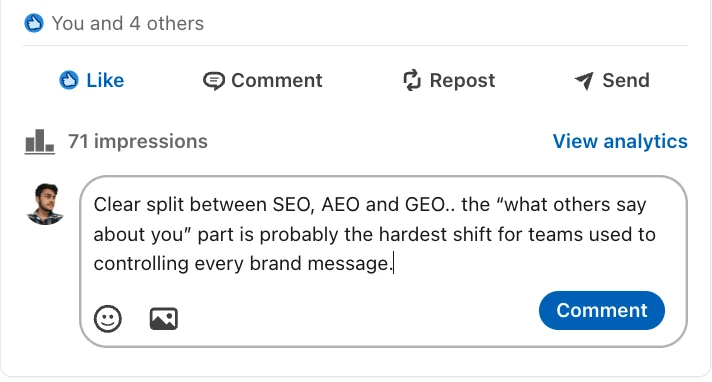
Clear split between SEO, AEO and GEO.. the “what others say about
you” part is probably the hardest shift for teams used to controlling every brand
message.
Points at one specific idea in the post and adds a thought.
A bad AI comment is worse than no comment. It tells people you did
not read their post, and it hurts the very growth you wanted.
Why other tools did not work
for me
The popular comment tools in the
Chrome Web Store are mostly closed source and freemium. They failed me in four
ways.
Generic output. Long, polite template comments that could sit
under any post.
One voice for everyone. Every user sounds the same, so nobody
sounds like themselves.
Your data goes to their server. Posts and your profile pass
through a company you do not know.
Another monthly plan. A markup on top of AI that already costs
less than a rupee per comment.
Key Decisions
Every choice came back to one goal: a
comment you would be happy to post under your own name, in under a minute.
DECISION 01
Inside the comment box, not in a popup
The button shows up only when you click a comment box, right where you are already
typing. No side panel, no new tab, no copy and paste.
Why: speed is the whole point. Every extra step means fewer comments.
DECISION 02
Your voice, set by you
A persona (role, expertise, industry) decides what you notice. Voice samples, a few of
your own comments, decide how you sound.
Why: comments only build your name if they sound like you.
DECISION 03
Bring your own key, no backend
You paste an API key from your own AI provider: OpenAI, Claude, Gemini, Groq,
OpenRouter, or Ollama running free on your laptop. There is no InlineAI server.
Why: no subscription, no data leaving your browser, nothing for me to
run.
DECISION 04
It never posts for you
InlineAI only writes into the box. You read it, change it, and press LinkedIn's own
Comment button.
Why: your name is on it. A human should always make the final call.
What I cut from V1
Saying no kept V1 small enough to ship fast.
Auto posting
Many tones
Accounts
Paid plans
Analytics
Cloud sync
Other platforms
Rewrite my draft
Two came back later,
once V1 proved itself: a keyboard shortcut, and X support.
InlineAI on Popular Posts
I ran InlineAI on popular posts by well known
product managers and designers, on LinkedIn and X. Each comment below took one click. I blurred
the authors, and none of these were posted: they were written for this case study.
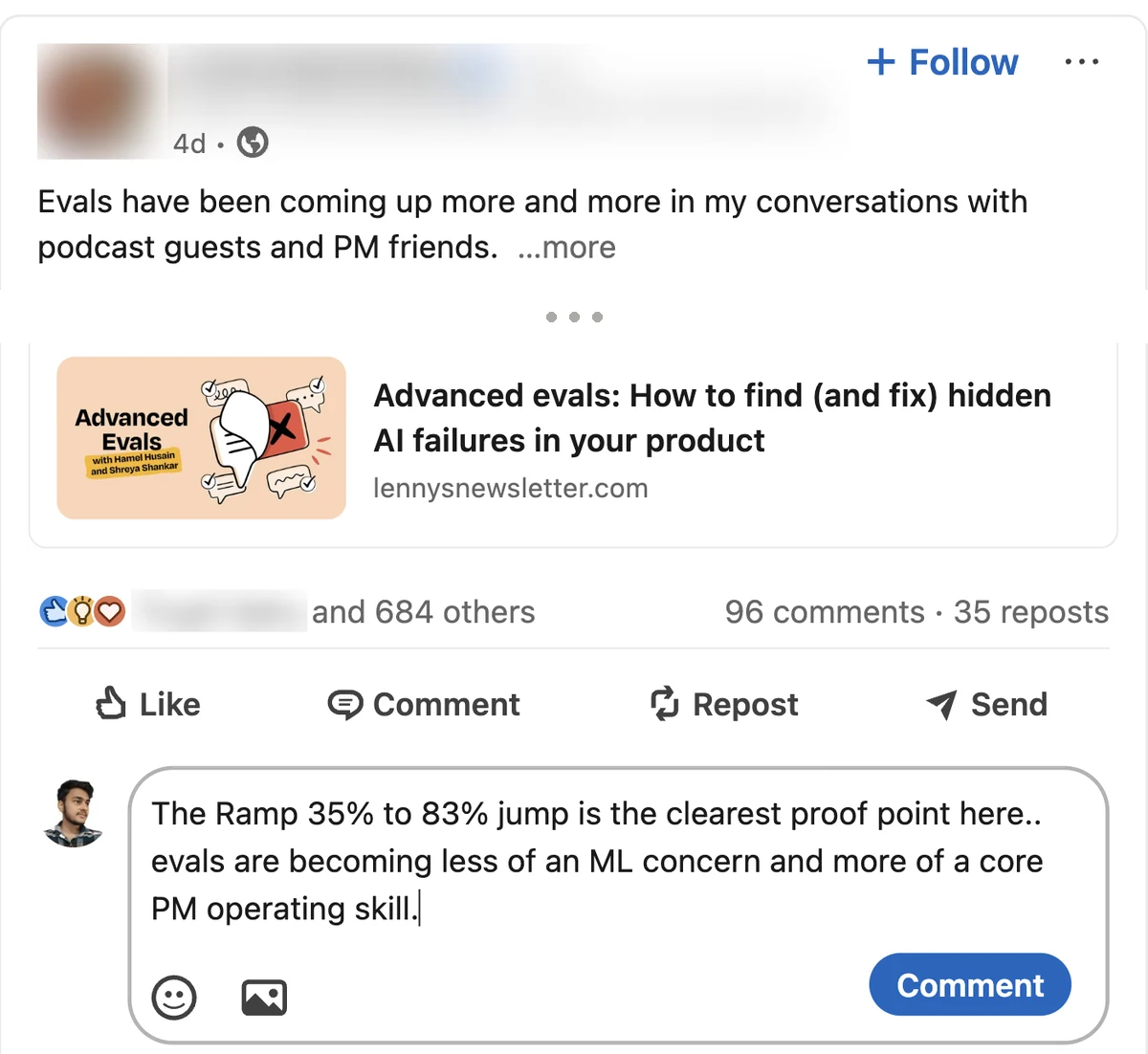
LinkedIn · PM newsletter writer · 680+ reactionsIt picked the most specific number from the full post (Ramp's 35% to 83%)
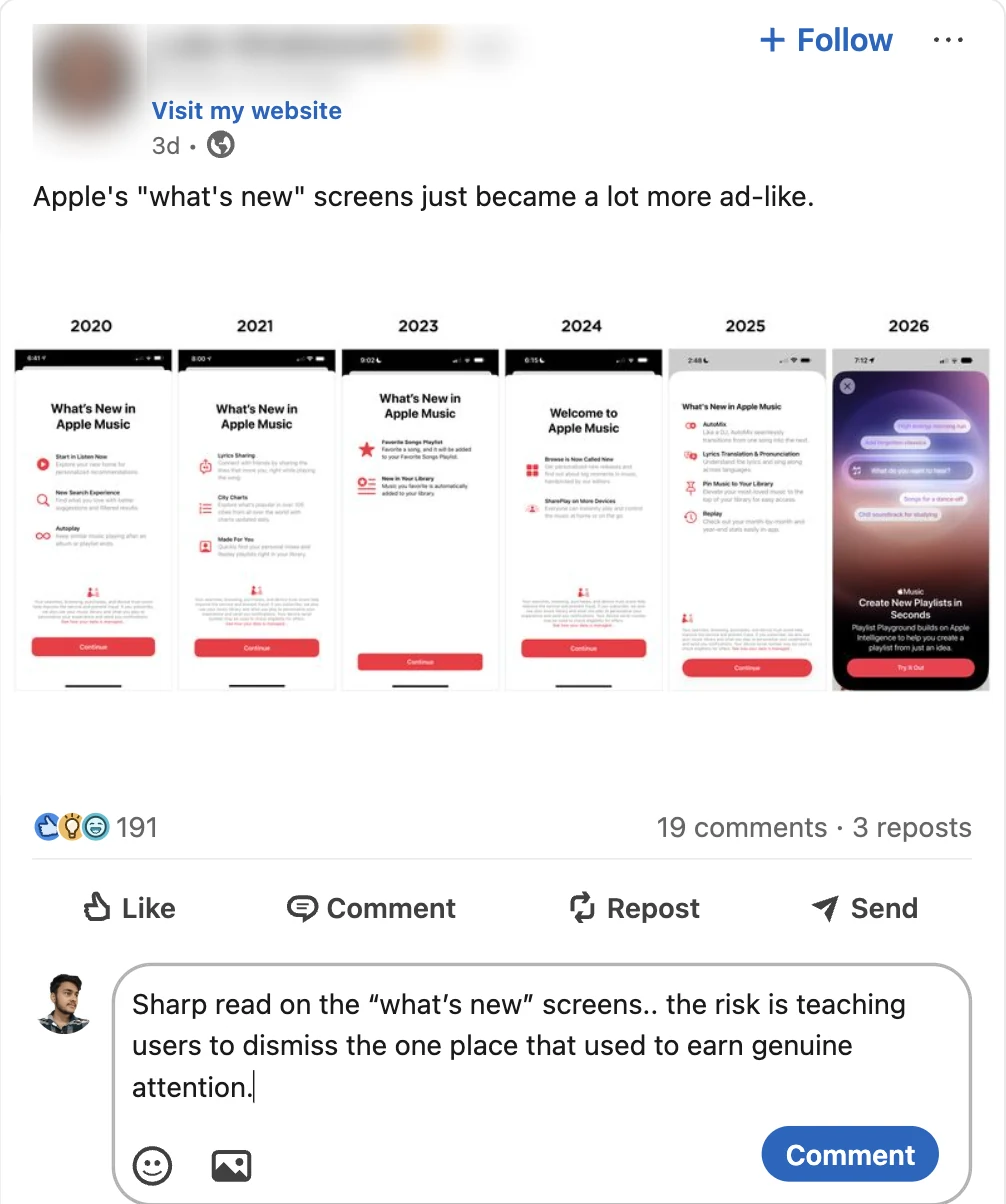
and added a take.LinkedIn · Design veteran · 190+ reactionsOn a one line post with an image, it reacted to the design risk, not the
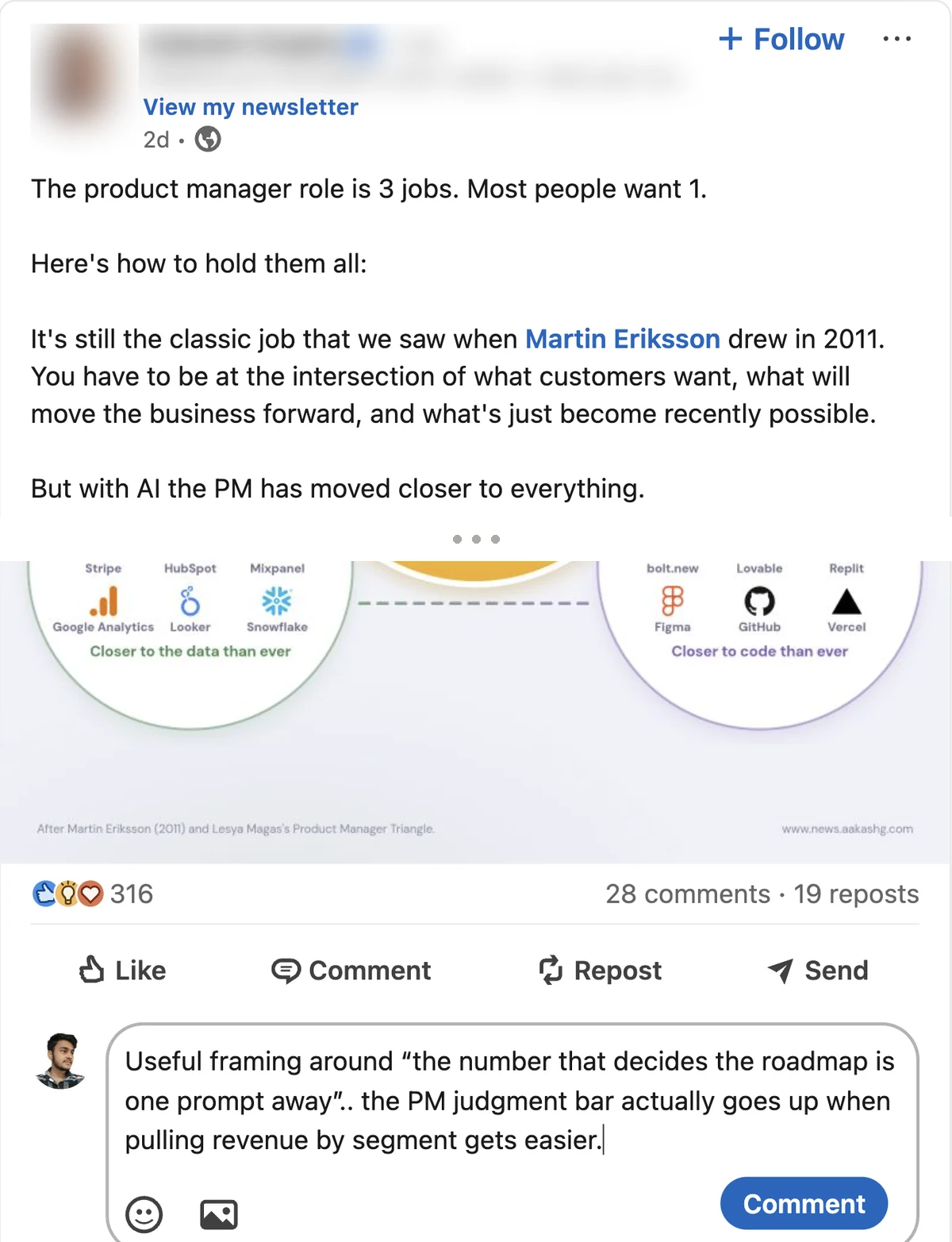
obvious joke.LinkedIn · PM creator · 310+ reactionsIt picked up a line from further down the post, after opening "see more" by itself.
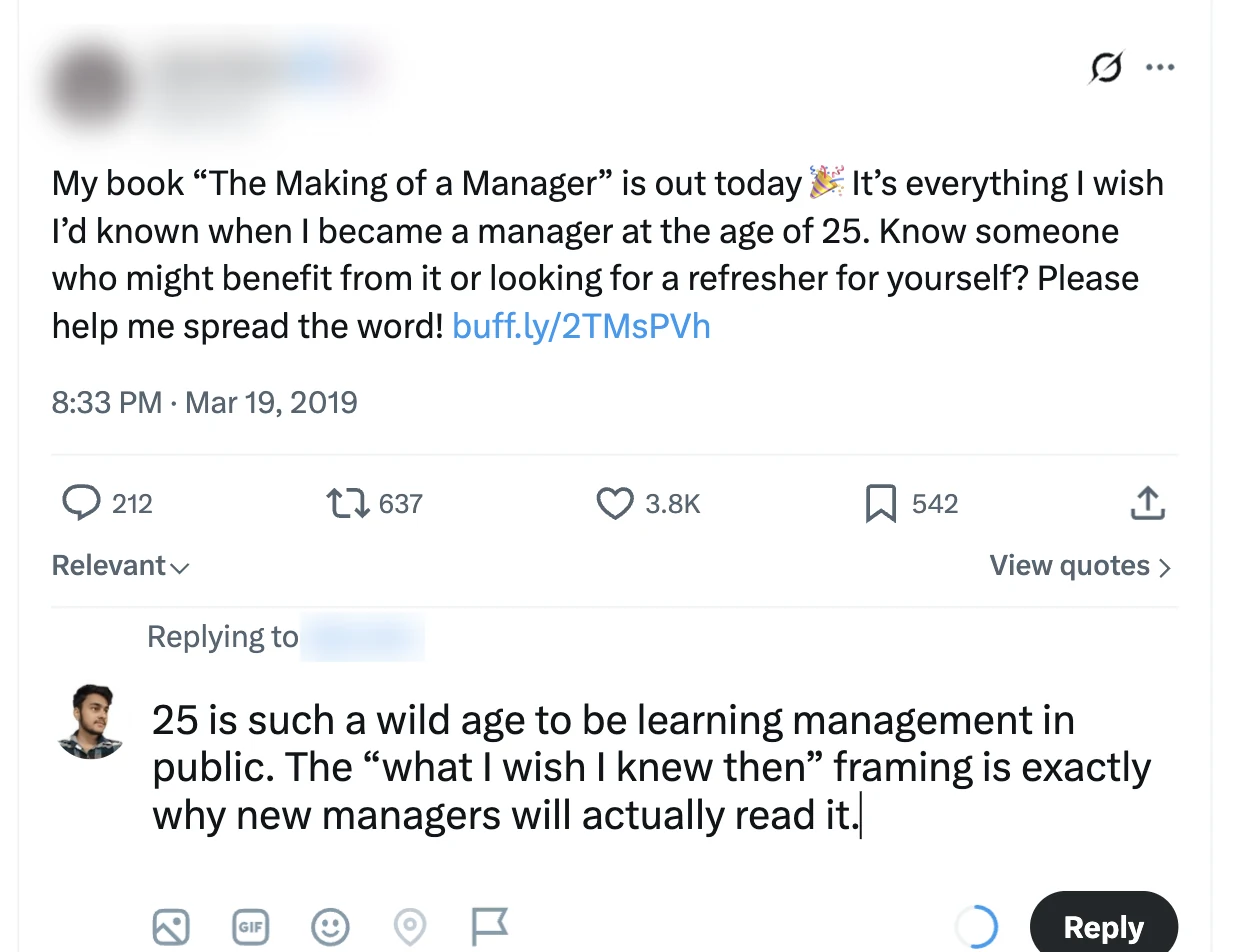
X · Design leader · 2019 post · 3.8K likesOn X it writes shorter replies that stay under 280 characters. X's own
character counter stays in sync.
Features
Small on purpose. Everything here exists to get
you from an empty box to a good comment faster.
One click, in the box
A “Write with AI” pill appears inside any comment or reply box.
Persona
Your name, role, expertise and industry decide what you notice in a post.
Voice samples NEW
Paste a few of your own comments. It copies how you write, never what you said.
LinkedIn and X
Feed, posts, profiles, company, group and event pages, plus X replies.
6 AI providers
OpenAI, Claude, Gemini, Groq, OpenRouter, or a free local model with Ollama.
Reads the whole post
Opens “see more”, notes images or videos, and reads the original post when you reply.
Keyboard shortcut
AltShiftW to write, Esc to stop.
Safe with your drafts
Asks before replacing text you typed. Keeps the @mention in replies. Never posts.
Skips spam
On “comment YES for the PDF” posts it says “Not worth a comment” instead.
Every language
Replies in the post's language: English, Hindi, Hinglish, Spanish and more.
Open prompt
Read the full prompt in settings, copy it, or replace it with your own.
Light and dark
The pill matches LinkedIn's theme and never clashes with the page.
How to Use It
Setup takes about two minutes. After that, each
comment takes one click.
Install itDownload the code from GitHub and build it (or grab the
ready zip). In Chrome, open chrome://extensions, turn on Developer mode,
click “Load unpacked” and pick the dist folder. A Web Store listing is
coming.
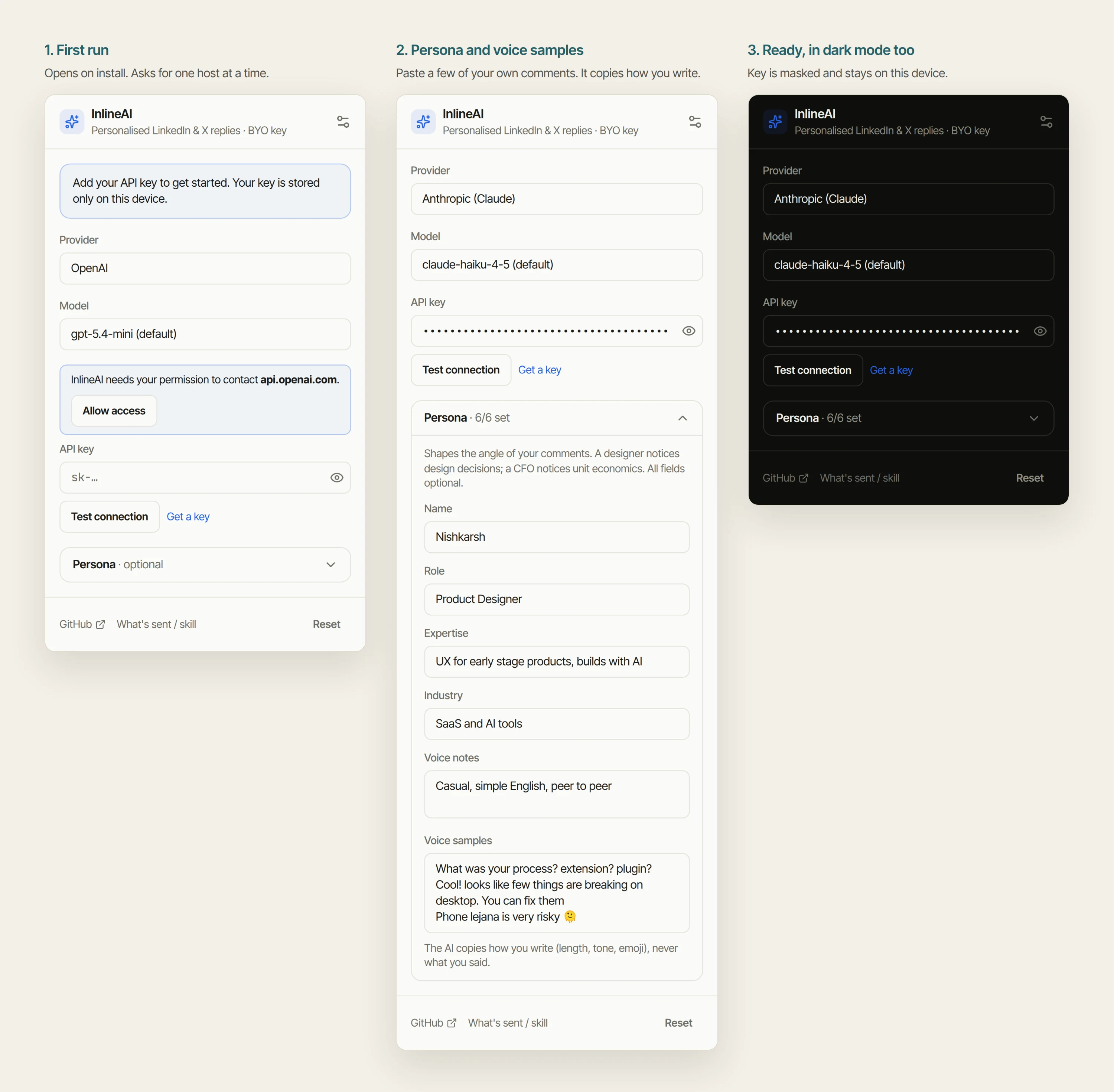
Pick your AI and paste your keySettings open by themselves. Choose a
provider, click “Allow access” for that one site, paste your API key, and press “Test
connection”. Using Ollama? No key needed.
Tell it who you areFill in your persona and paste 3 to 5 of your own
comments as voice samples. All optional, but this is what makes it sound like
you.
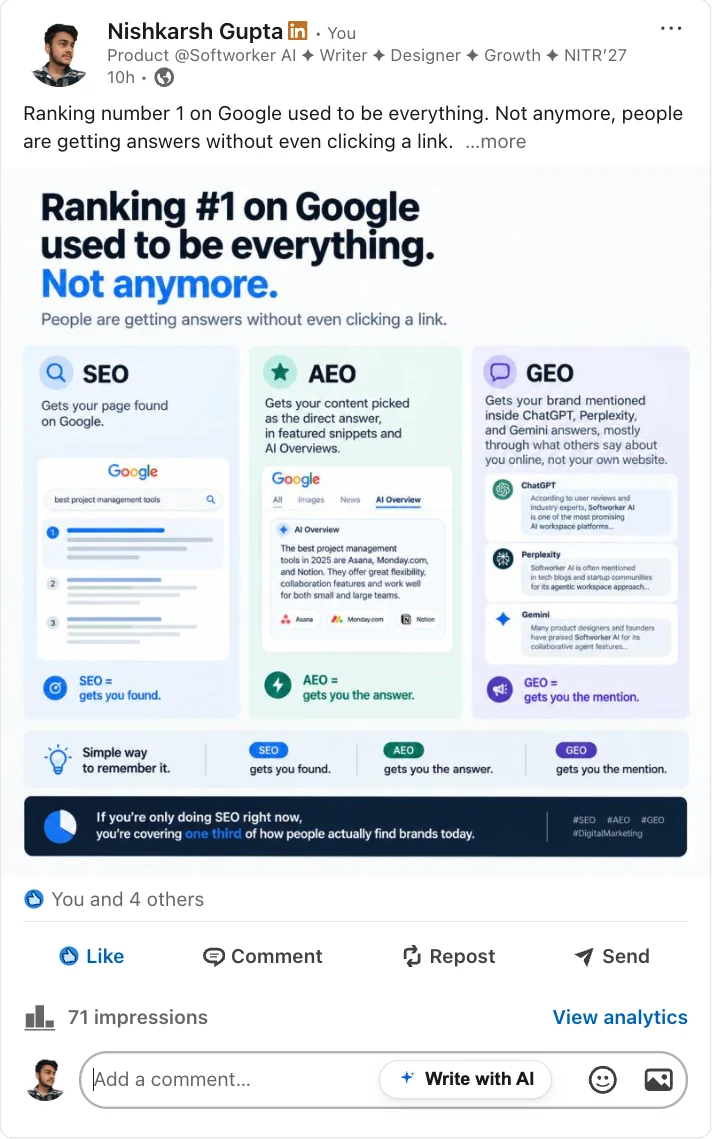
Click a comment boxOpen LinkedIn or X, click the comment box under
any post, and press “Write with AI” (or AltShiftW).
Read, edit, postThe comment types itself into the box. Change
anything you like, then press Comment yourself.
Steps 2 and 3 in the popup: first run, persona with voice samples, and
ready in dark mode
Step 4: the pill waits inside the comment boxStep 5: a post specific comment, not posted until you say so
A SIMPLE ROUTINE TO TRY
15 minutes a day: comment on 10 posts from people a
little bigger than you in your field. Reply to everyone who replies to you. Post when you
have something worth saying.
Design Details
The pill had one job: feel like it belongs on LinkedIn without looking
like LinkedIn. It is small, sits inside the box, and matches LinkedIn's light and dark themes.
A Shadow DOM keeps LinkedIn's styles and mine from touching each other.
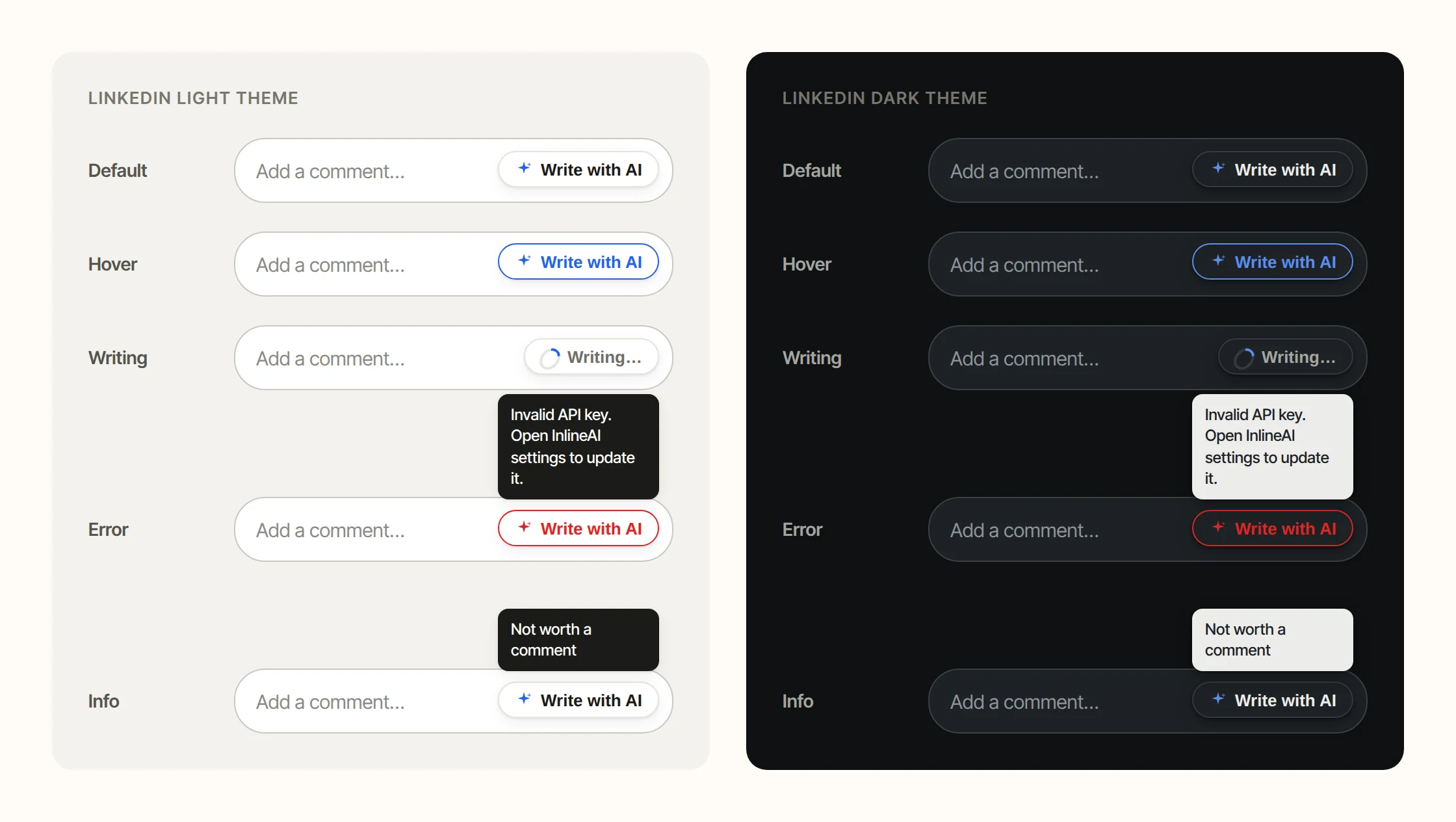
I designed every state, because an AI tool
spends a lot of its life waiting or failing. Errors say what went wrong and what to do next,
in plain words.
Every state of the pill, in both LinkedIn themes
The “Writing…” state, caught live on X
A bug I found while
making this case study
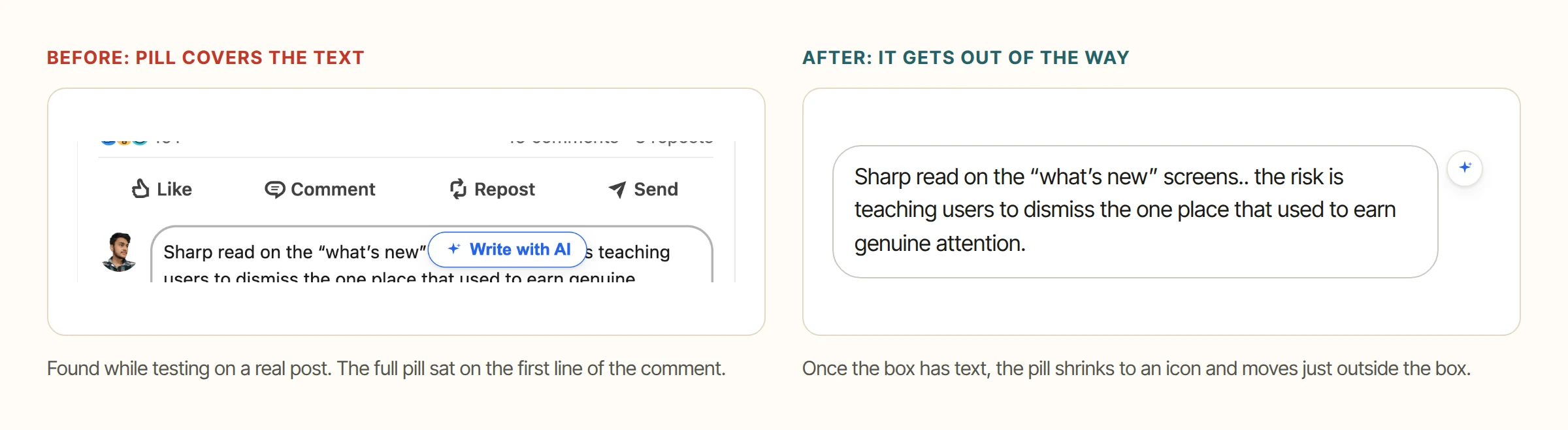
Testing on live posts showed that once a comment
was written, the pill sat right on top of its first line. I changed it so the pill shrinks to
an icon and moves just outside the box as soon as the box has text.
Small things that build
trust
It never deletes your words
If you already typed a draft, InlineAI asks before replacing it.
Easy to stop
Press Esc, click the pill again, or just start typing.
Never steals focus
The comment only types into the box while you are still in it.
Stays out of private spaces
It never shows up in messages, DMs or the new post box.
Your Voice, Not Mine
The button is easy. The words are hard. The prompt is the actual product, so I treat it like a design file, with versions and a changelog.
To make comments sound human, I tuned the prompt on comments I wrote myself, like
“What was your process? extension? plugin?”. It worked, but it also meant
every user got my voice. That is the exact problem I was trying
to solve.
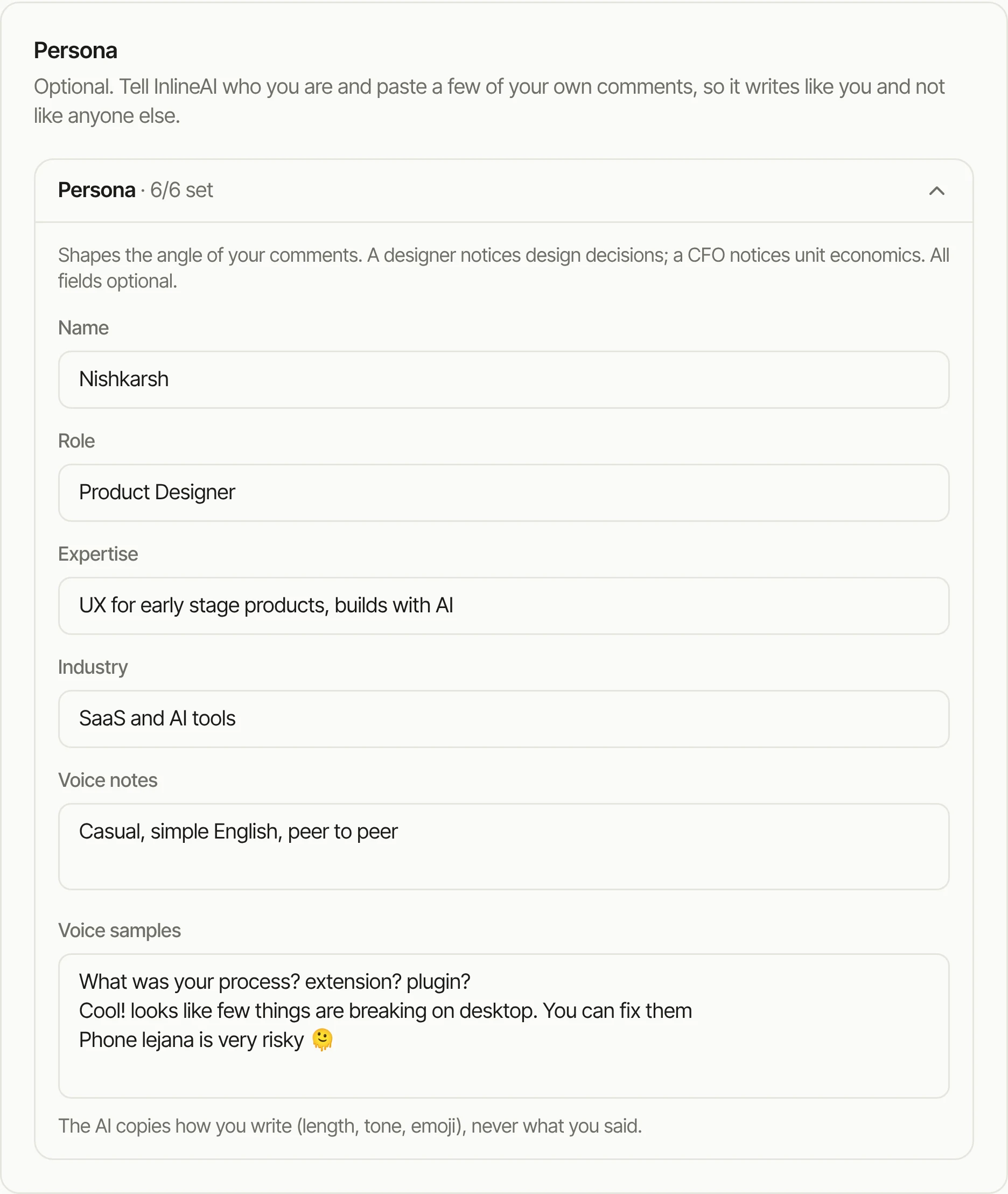
So in version 0.4 I took my voice out. The prompt now holds only the craft
rules, and the voice comes from each user: their persona decides what they
notice, and their voice samples decide how they sound. Leave it empty and you
get a plain, friendly default.
Persona and voice samples, on the settings page
If a stranger could guess it was AI
written, you failed.From the LinkedIn prompt
Rules every comment follows
Short. Most comments are 5 to 25 words.
Specific. Point at one specific thing: a number, a tool, a
phrase.
Add something. An opinion, a tip, or one honest question.
Simple words. No “insightful” or “game changer”.
No template. Every comment starts differently.
Great post
Thanks for sharing
Resonates
Game changer
Delve
Journey
🔥 🚀 🙌
Privacy You Can Check, Not Just Trust
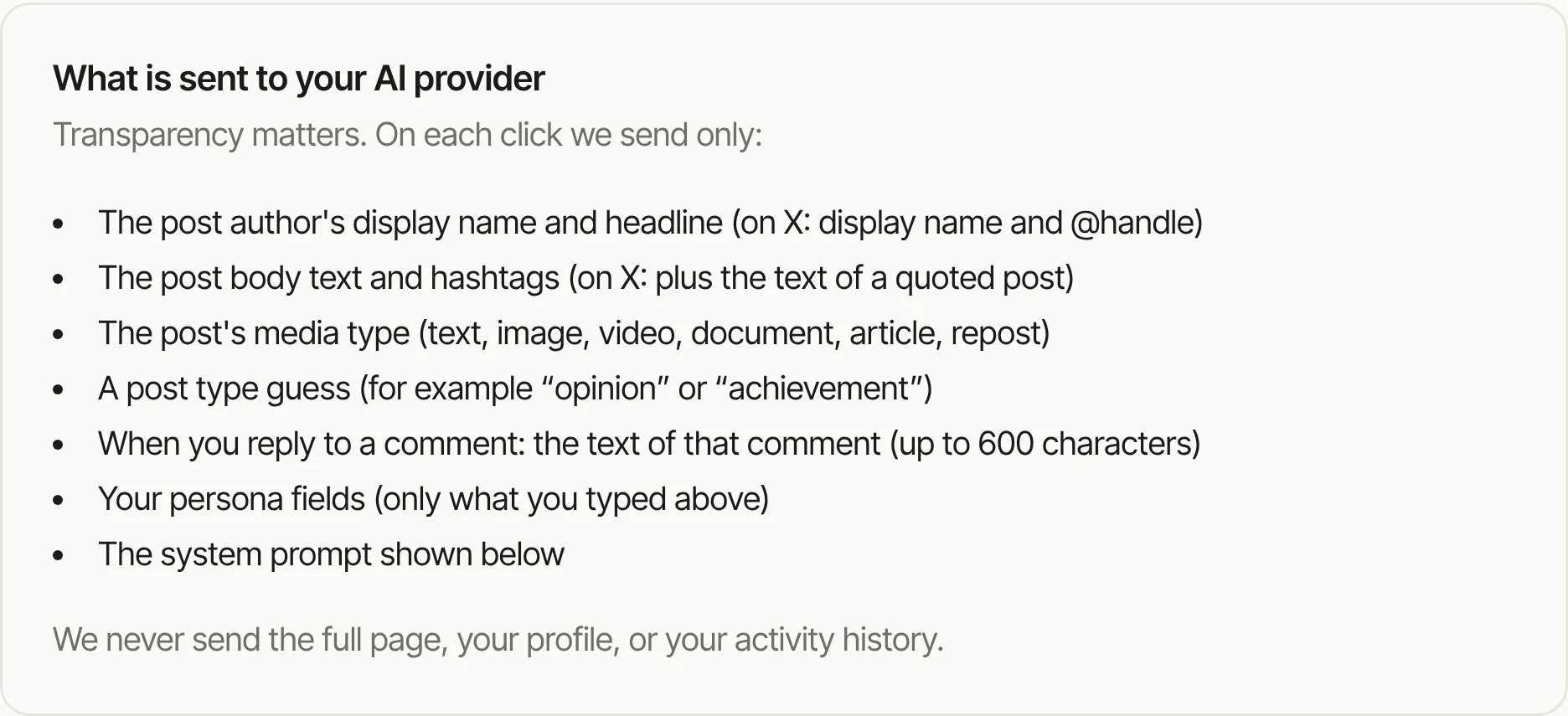
A tool that reads what you see on LinkedIn has to earn trust. So instead
of a privacy promise, the settings page shows exactly what leaves your browser on each click,
and what never does.
Ask for the least. The only fixed permission is storage. Access to an AI
provider is asked for one site at a time, only when you pick it.
The key stays home. Saved only on this device, never synced, and hidden in
debug logs.
Posts cannot give orders. Post text and voice samples are marked as
untrusted, so a post that says “ignore your rules” cannot take over the AI.
LinkedIn cannot spot it. The extension's files are hidden from the page.
Building It With AI
I am a designer, not a Chrome extension engineer. So I wrote
the spec like a product manager and let AI agents write the code.
Before any code, I wrote one detailed spec for the coding agent: the user, the
pain, the flows, every button state, the look, the permissions, what to test, and
a clear list of what not to build.
My job was to review, test on live posts, and push back when something felt
wrong. The spec is public in the repo.
May 2026 · V0.1First version ships. The pill,
post reading, streaming, six providers, the settings page and the first prompt.
Sep 2026 · AuditI found serious problems. A private
signing key in the repo, retired AI models, empty answers that looked like success, and
comment boxes the pill missed.
Sep 2026 · V0.2Fixed and hardened. Security
fixes, clear errors, draft protection, a keyboard shortcut, and a custom model field.
Tests grew from 19 to 54.
Sep 2026 · X supportSecond platform. Each site
sits behind a small adapter, so adding X took one clean step.
Sep 2026 · Personal voicesEvery user sounds like
themselves. Voice samples, a neutral prompt, and the pill overlap fix. Tests
now at 75.
Results
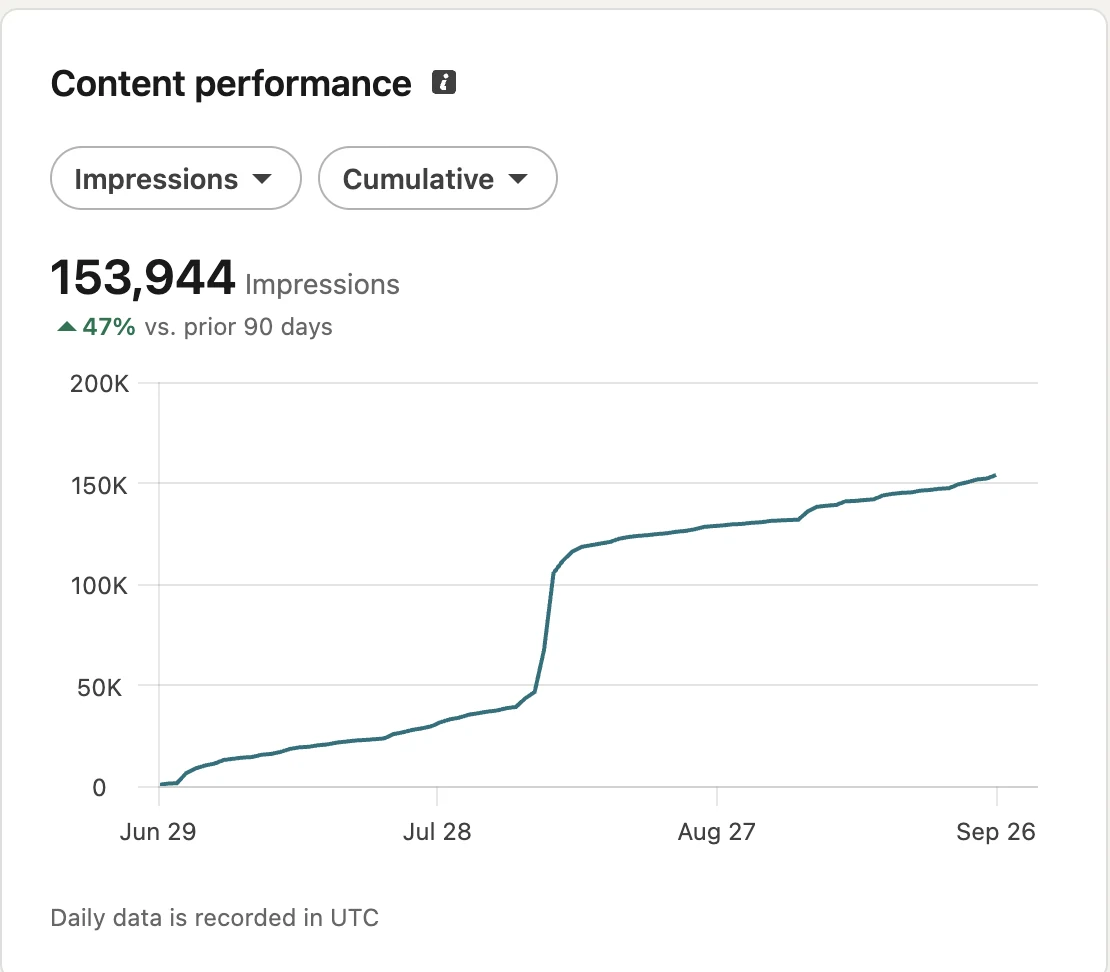
Here is where my account stands after 90 days of posting and commenting.
To be honest about it: these numbers come from my posts and comments together, and I cannot
split out how much InlineAI alone added. What I can say is that comments are now a steady,
daily source of reach for me, and InlineAI is how I keep up.
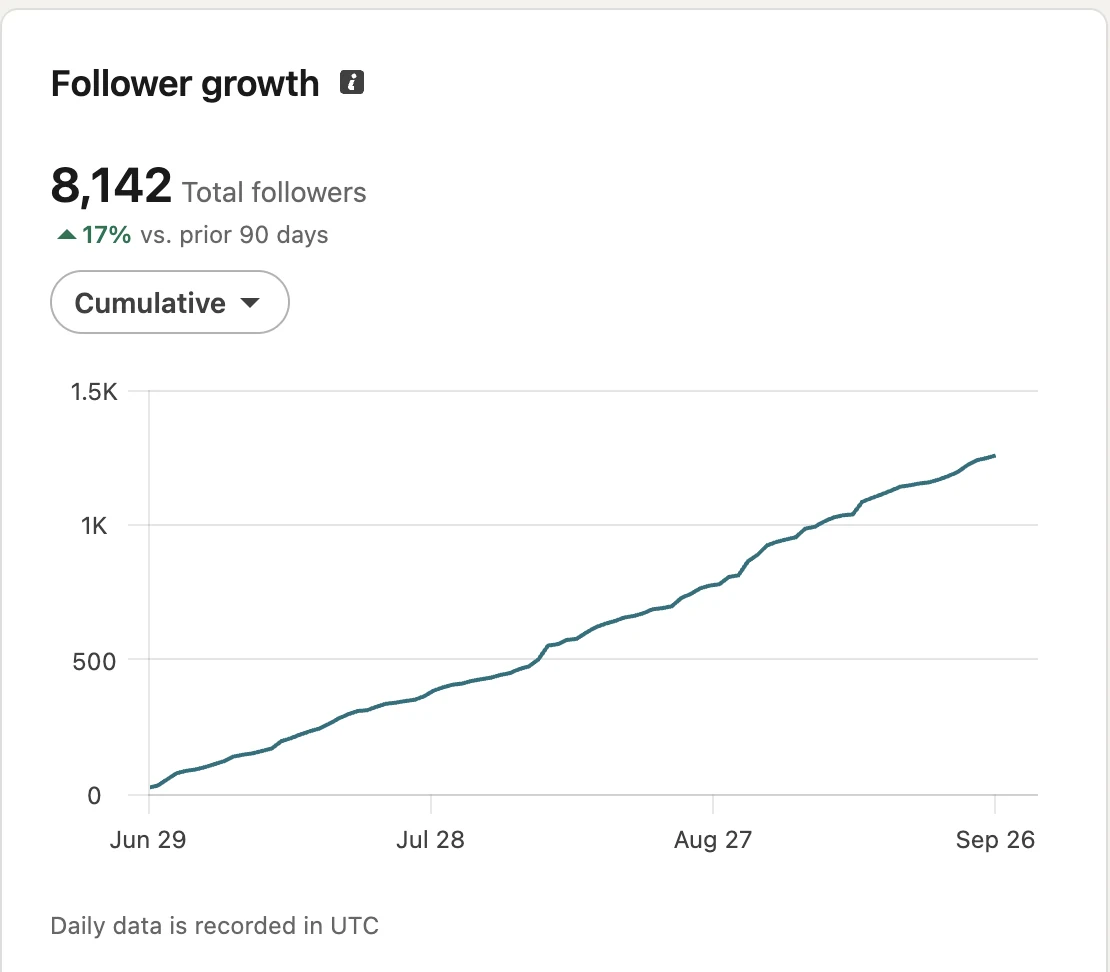
153,944 impressions in 90 days, up 47%.8,142 followers, about 1,250 new in 90 days (up 17%).
3,361Impressions on one short comment
2 + 6Platforms and AI providers
75Automated tests, run on every change
What I Learned
Start from the growth loop, not the feature. “Write comments” is a feature. “Show up in
front of new people 10 times a day” is the reason anyone cares.
Research changed the problem. I thought people needed AI to write comments. 7 out of 10
already used it. What they needed was fewer steps.
In an AI product, the words are the interface. I spent more time on the prompt than on
the pixels, and it was the right call.
Build for yourself, then check you did not build only for yourself. My own voice
was baked into V1 until I caught it.
Testing on live posts beats any mockup. Both the overlap bug and the voice problem only showed up in daily use.
What is next
A Chrome Web Store listing, an “improve my
draft” mode, quick chips like shorter or add a question, and Reddit through the same adapter
setup.