With no MVP, our website could not show teams what they would get. So I designed and built an interactive product tour. People try Softworker in 3 guided use cases, then join the waitlist.
My role
AI Product Designer
Team
Early employee, working with the cofounder, Gaurav
Timeline
May to September 2026 (4 months)
Impact overview
Waitlist
120+ B2B teams joined in 4 months. Many joined after the tour went live.
Design partners
2 teams became design partners. Both tried the tour first.
Product tour
3 guided use cases and 63 steps, built before the MVP.
Summary
Softworker is a multiplayer workspace where teams and AI agents get work done together. When I joined, there was no product to show and no one on the waitlist.
We rebuilt the website first, but people still could not picture what the MVP would give them. Reading about AI agents is not the same as trusting them.
So I made the product before the product: a clickable tour where you watch an agent work and approve its action yourself. Then you join the waitlist.
In 4 months, 120+ B2B teams joined the waitlist, and 2 became design partners.
120+B2B teams on the waitlist
2Design partners signed
3Guided use cases in the tour
4Months, start to finish
The Problem: Nobody Could Picture the MVP
We were a new AI startup with no demo, no customers and no logos. The website came first. We rebuilt it three times, and each version explained the idea better. But the response stayed weak.
When we talked to people, the reason was clear. They could not picture what the MVP would actually give them. And with AI agents, the question that matters is not “what can it do?” but “what will it do without me?”. No headline answers that.
The job
Let a busy team lead feel Softworker working, and trust it, in a few minutes, before the MVP exists. Then make joining the waitlist the obvious next step.
Why a Tour, Not Just a Video
We first planned only a product video. A video is quick to make, but you sit back and watch. You never make a decision, so you never feel in control. For an agent product, control is the whole point.
A tour lets people do the important part themselves. I leaned on a few UX and business principles to shape it.
UX principles
Learning by doing. People trust what they try more than what they are told. So you click, the agent works, you approve.
Jakob's law. A sidebar, an inbox and threads, like the tools teams use every day. Nothing new to learn.
Progressive disclosure. One small step at a time, with a short tip that points at the next click.
Sense of control. The agent stops and waits for you. Pressing Approve is the moment it clicks.
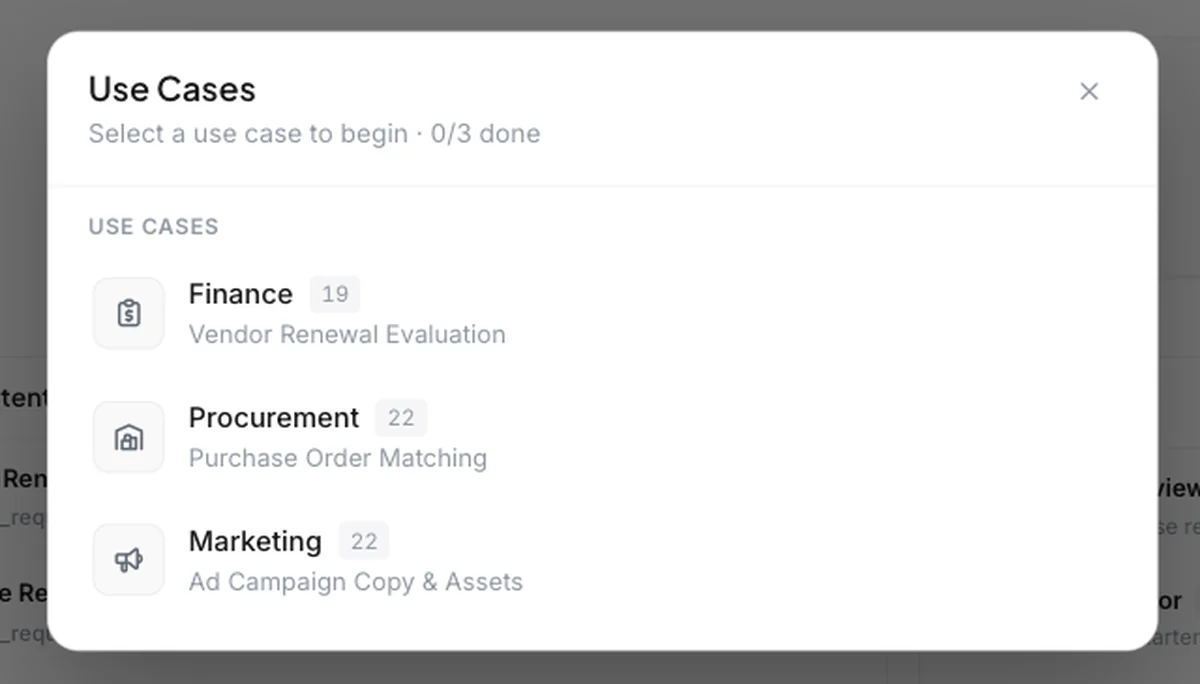
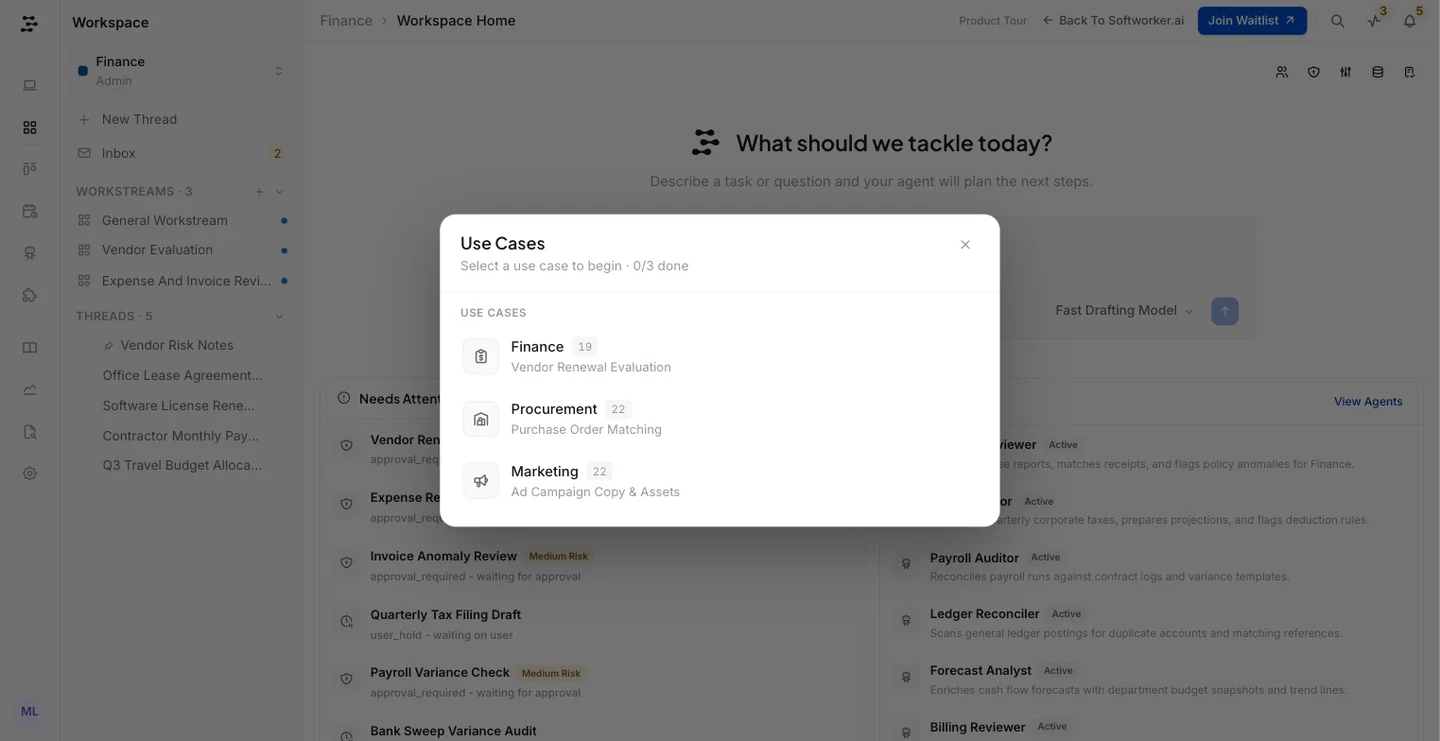
Goal gradient. “0/3 done” and step counts show how close you are, so people finish.
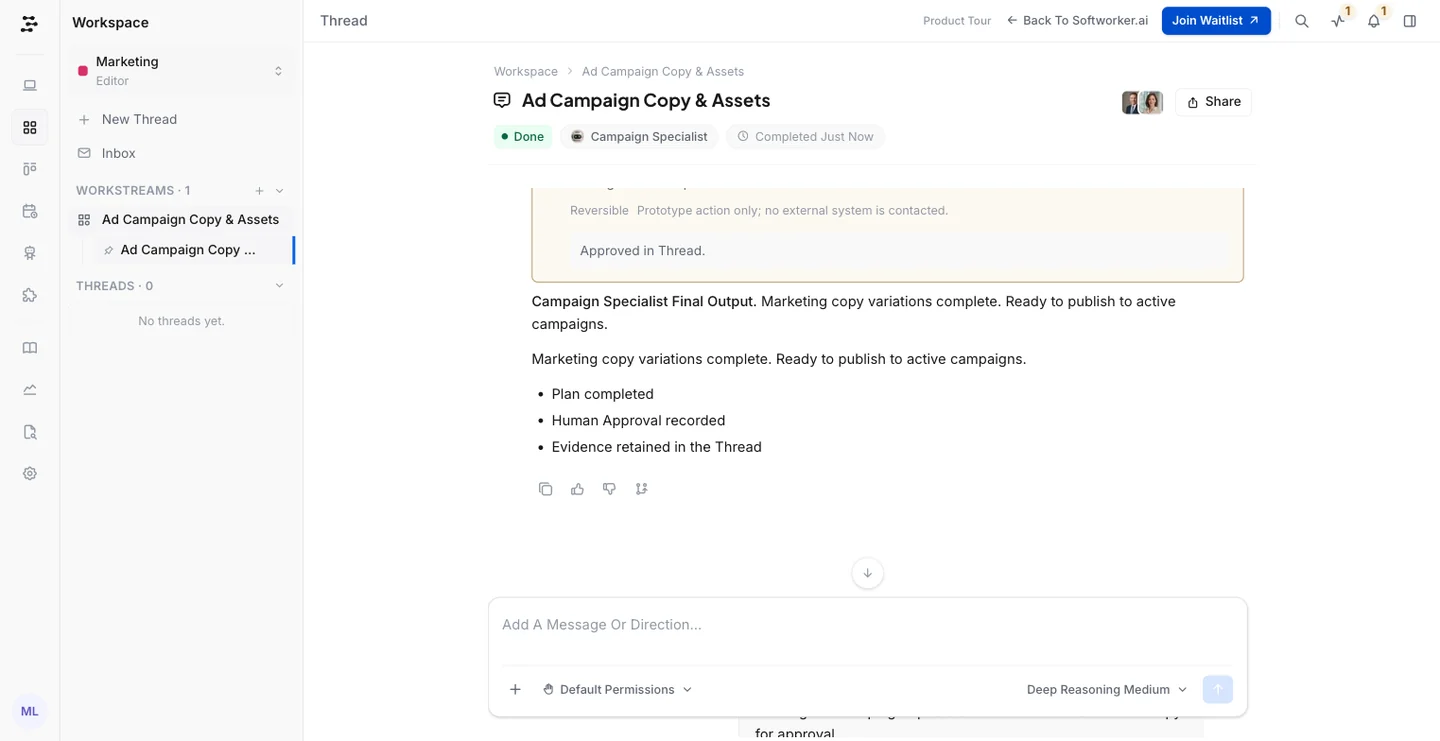
Peak end rule. Each tour ends on a clear result, with the evidence kept, and Join Waitlist right there.
Business principles
Time to value. No sign up, no setup. You see the product working in the first minute.
Trust before the sale. B2B buyers need to see the plan, the work log and the approval before they hand work to AI.
Validate before building. A tour costs far less than an MVP and tells us which use cases people care about.
A warmer waitlist. Someone who finished a tour knows what they are signing up for.
One asset, many uses. The same tour works on the website, in LinkedIn messages, on sales calls and with investors.
Choosing the First Use Cases
We wanted to win one vertical first. Our research pointed at finance and procurement: lots of repeat work, clear rules and many approvals, which is exactly where agents with approval gates help most.
Then we talked to friends and ex colleagues working in startups. One thing kept coming up: trusting AI with money is a hard first step. Nobody wants an agent to be the first thing that touches payments.
Marketing and sales felt different. The work is easy to see, a bad draft costs little and is easy to undo, and teams already use AI for copy. So marketing and sales became the first focus for the MVP.
The tour still has three use cases. Marketing is where most people start.
We kept finance and procurement in the tour on purpose. They show the approval gates on high stakes work, which builds trust for every team. For other kinds of work, Softworker comes with templates and skills for different workflows.
Inside the Tour
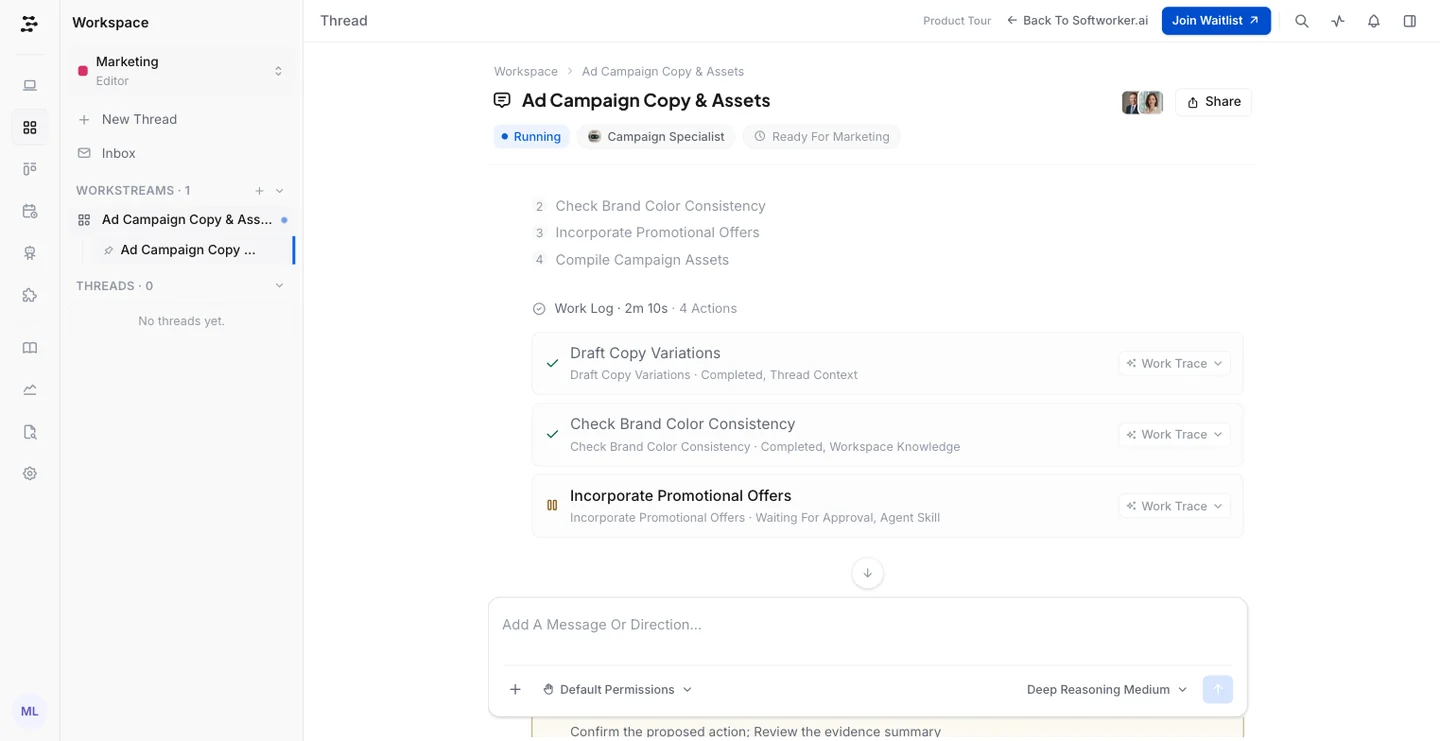
Here is the Marketing tour, start to finish. A request comes in from the growth team, an agent picks it up, shows its plan, stops before a risky step, and finishes once you approve.
The Marketing tour in 34 seconds. No sound needed.
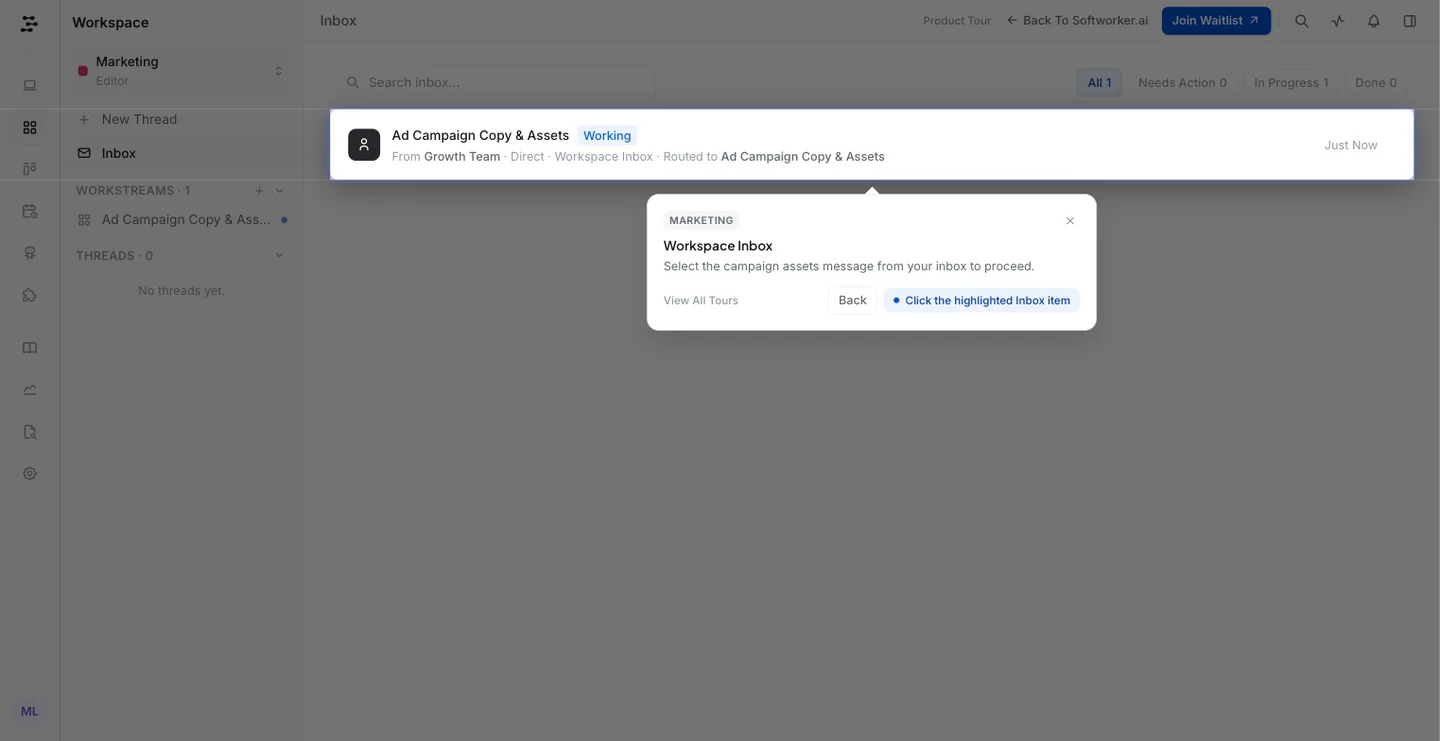
A request arrives. Work lands in a shared inbox, the way it would from Slack or email.
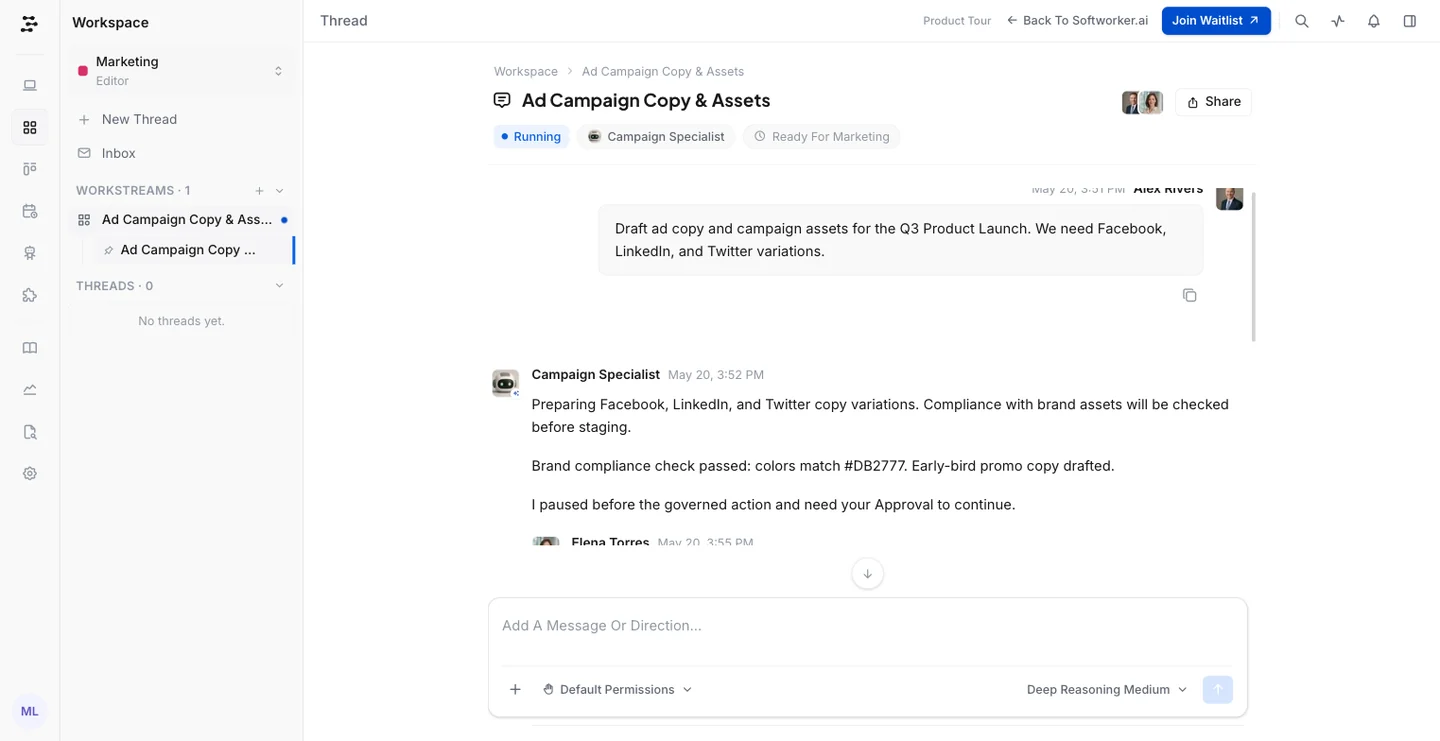
An agent picks it up. It writes as it works, and a teammate can step in with a note.
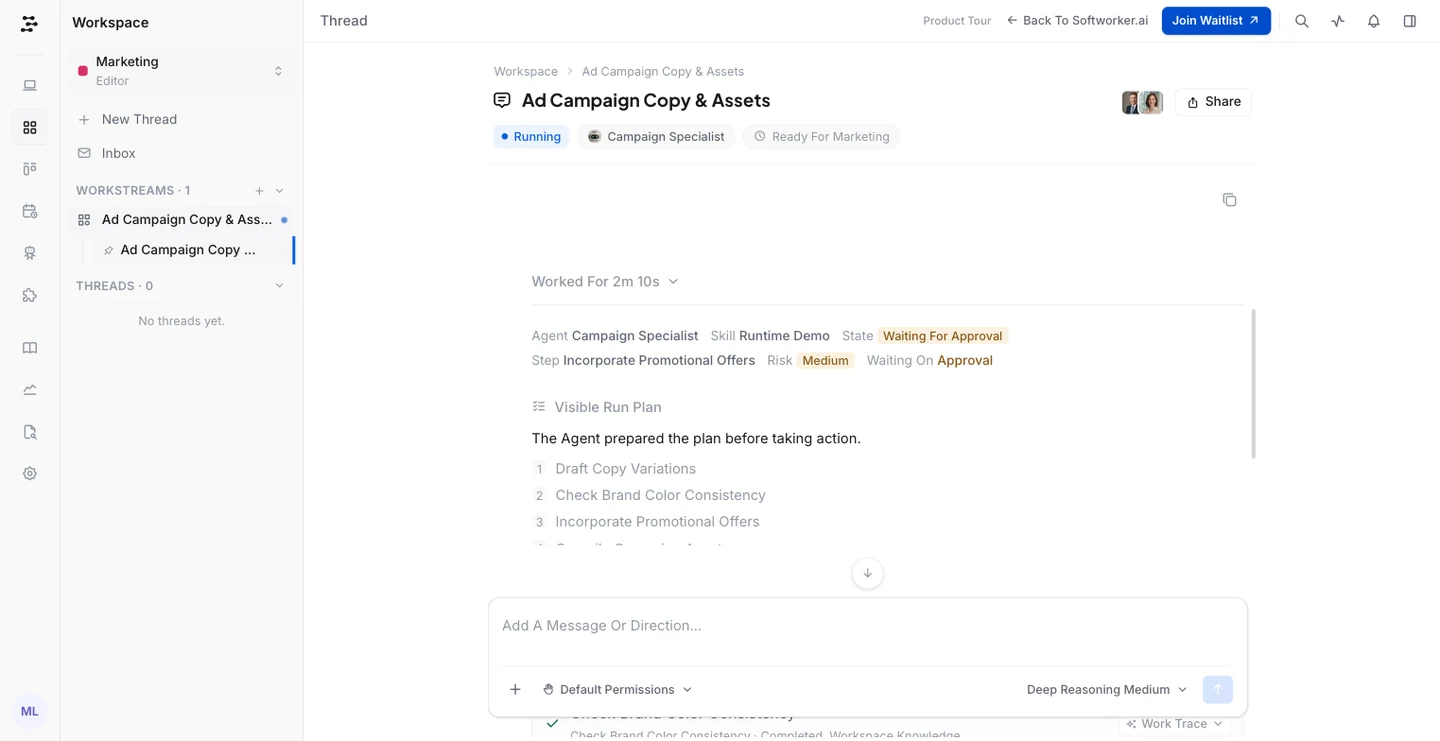
Its plan is visible. You see what it will do before it does it.
Every action is logged. Each step shows where its information came from.
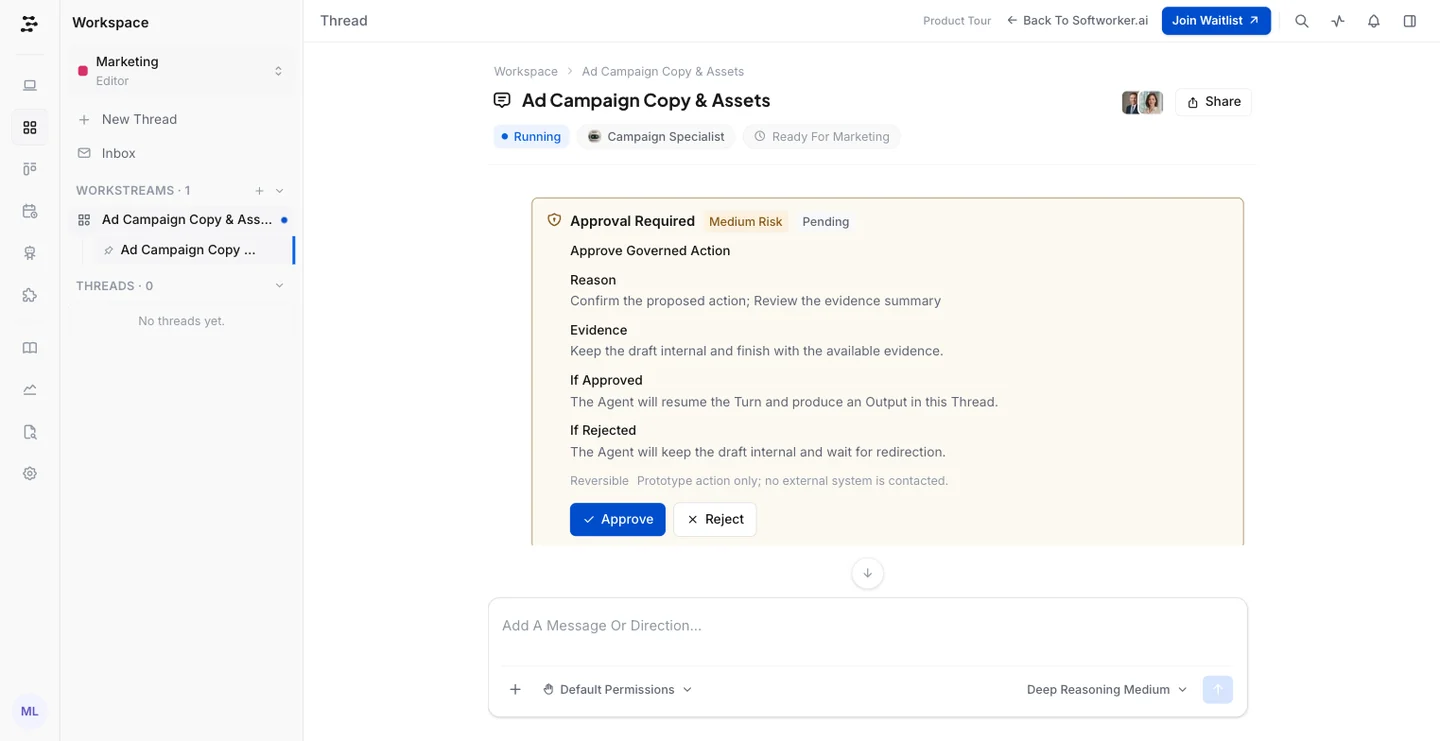
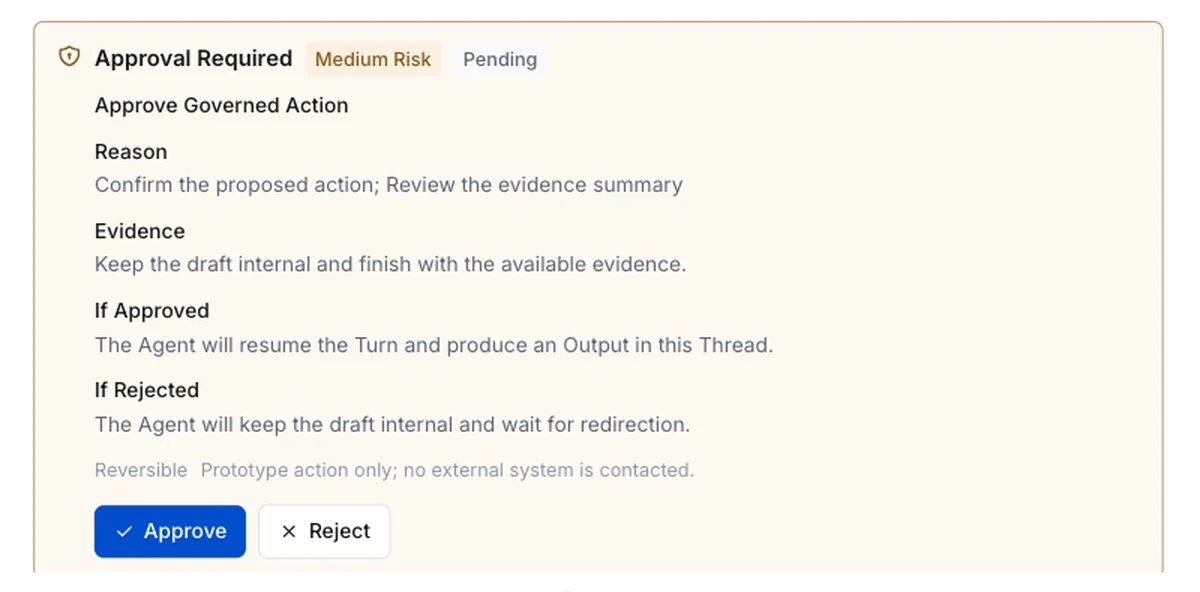
It stops and asks. Before the risky step, a person reads the reason and decides.
Done, with proof. The approval and the evidence stay in the thread for later.
Key Design Decisions
Decision 01
A guided tour, not an empty sandbox
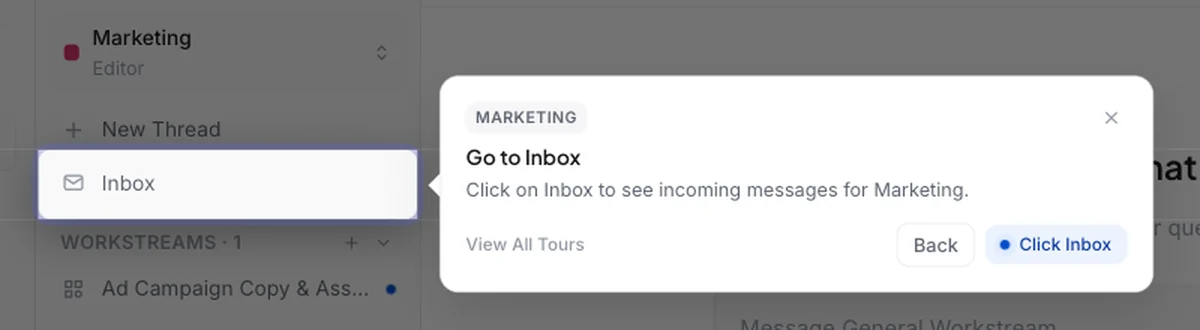
A blank workspace asks people to work out where to start. Each step has a short tip that points at the next click, with Back and View All Tours if you want to look around.
Decision 02
The approval gate is the hero moment
Every tour leads to one moment: the agent stops and asks you. The card shows the reason, the evidence, and what happens if you approve or reject. This is where people stop worrying about AI acting alone.
Decision 03
A busy company, honestly labelled
An empty product feels fake. The tour has 8 workspaces, 10 agents, 10 skills and 15 knowledge files, with believable tasks and risk levels. Every action also says “Prototype action only; no external system is contacted”, so nobody feels tricked.
Decision 04
The waitlist is always one click away
Join Waitlist sits in the top bar on every screen of the tour. Whenever someone is convinced, they can act. On the website, “Experience Product Tour” sits in the menu and the hero.
Decision 05
Progress you can see
The picker shows “0/3 done” and how many steps each tour has. Finishing one makes people curious about the next, and Reset Progress lets them start again for a colleague.
How I Built It
I mapped each use case and its steps in Figma, explored visual ideas in Flowstep, and wrote the scenarios and built the tour with Claude. We went through a few rounds of changes before landing on this version.
The actual product, sample data. The tour uses the same screens the MVP would use, filled with made up companies, people and tasks.
Scripted agents. Messages stream in as if the agent is working, so it feels alive without a backend.
One link. demo.softworker.ai/product-tour works on its own, so we could share it anywhere.
Before the Tour: The Website, in Short
The website came first. Each version taught us something, and the last one became the front door to the tour.
Version 1
Nobody joined
Big enterprise words, no proof and too much to read. After a week, the waitlist was empty.
Version 2
Clearer, still flat
One honest page, built in 3 days with AI. People could read about Softworker, but they could not see it.
Version 3
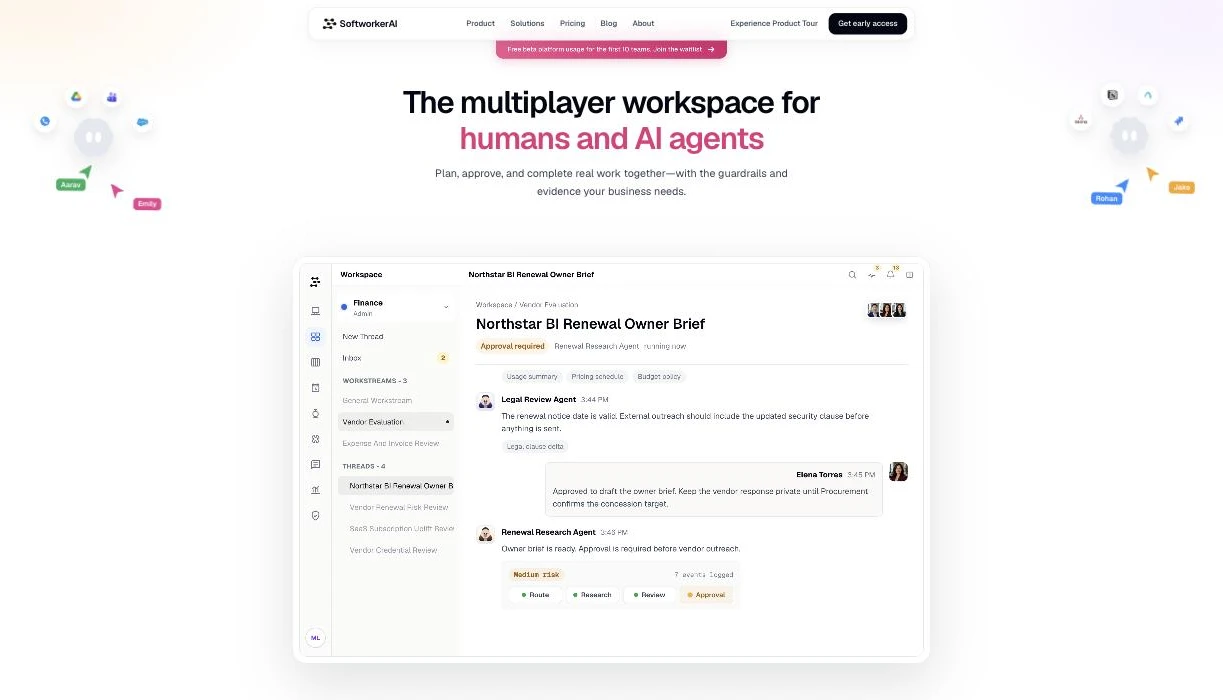
Let them try it
A plain headline, the product itself in the hero, and “Experience Product Tour” in the menu and the hero.
The whole website story, from version 1 to version 3, is in this short film.
The website story, 1:52
We also made a separate 90 second product video for LinkedIn and emails, for people who would not click through a tour.
The 90 second product video
Try It Yourself
Here is the tour, live. Pick a use case and follow the tips. It takes about 3 minutes.
Works best on a laptop. On a phone it opens in a new tab.
Results
From an empty waitlist to 120+ B2B teams in 4 months. Many of them joined after the tour went live. Two became design partners, and both went through the tour before they signed. The company names stay private.
What people told us
After the tour, people said it looked good and that they were excited to use the MVP. Then they signed up for the waitlist.
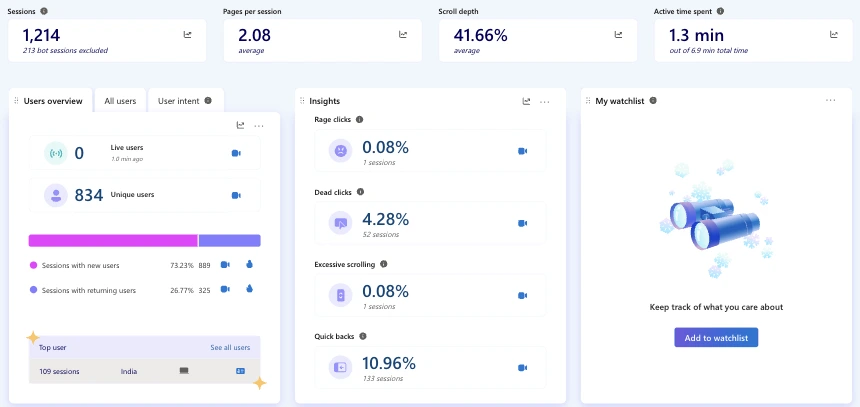
We did not wait for traffic. We found the right people on LinkedIn, wrote to them one by one, and shared the tour by hand. That is why our visitor numbers are small and our waitlist isn't.
830+Unique website visitors, May to Sept
~200Visits from LinkedIn, our top social source
2.1Pages per visit
0.08%Rage clicks, almost no frustration
Microsoft Clarity for the website, 1 May to 27 September 2026
What the Tour Kept Doing
The tour did not stop at the waitlist. It kept working long after people joined.
Sales calls. We click through the use case that fits the team, live, instead of showing slides.
Investor conversations. It shows the product vision more clearly than a deck.
What I Learned
Let people try it. For AI agents, trust comes from pressing Approve yourself, not from reading about it.
You can ship the experience before the product. A tour with fake data taught us what to build first.
Pick the first use case people are ready to trust, not only the biggest one.
A great demo still needs the right people to see it. Outreach one by one filled the waitlist.
Further reading
I also wrote about the first redesign in more detail.